Session Replay: How PMs Avoid Privacy Violations
A comprehensive guide for Product Managers on implementing session replay tools responsibly, balancing user insights with data privacy and security protection.
Session Replay: How PMs Avoid Privacy Violations

March 16, 2026
In an increasingly user experience-focused digital landscape, session replay tools have become essential for Product Managers (PMs). They offer a detailed view of how users interact with a product, revealing bottlenecks and improvement opportunities that traditional metrics may not capture. However, this powerful tool also raises concerns about privacy and data security. This guide explores how to implement session replay responsibly, balancing insights with protecting your users.
What Session Replay Collects and Why It Matters
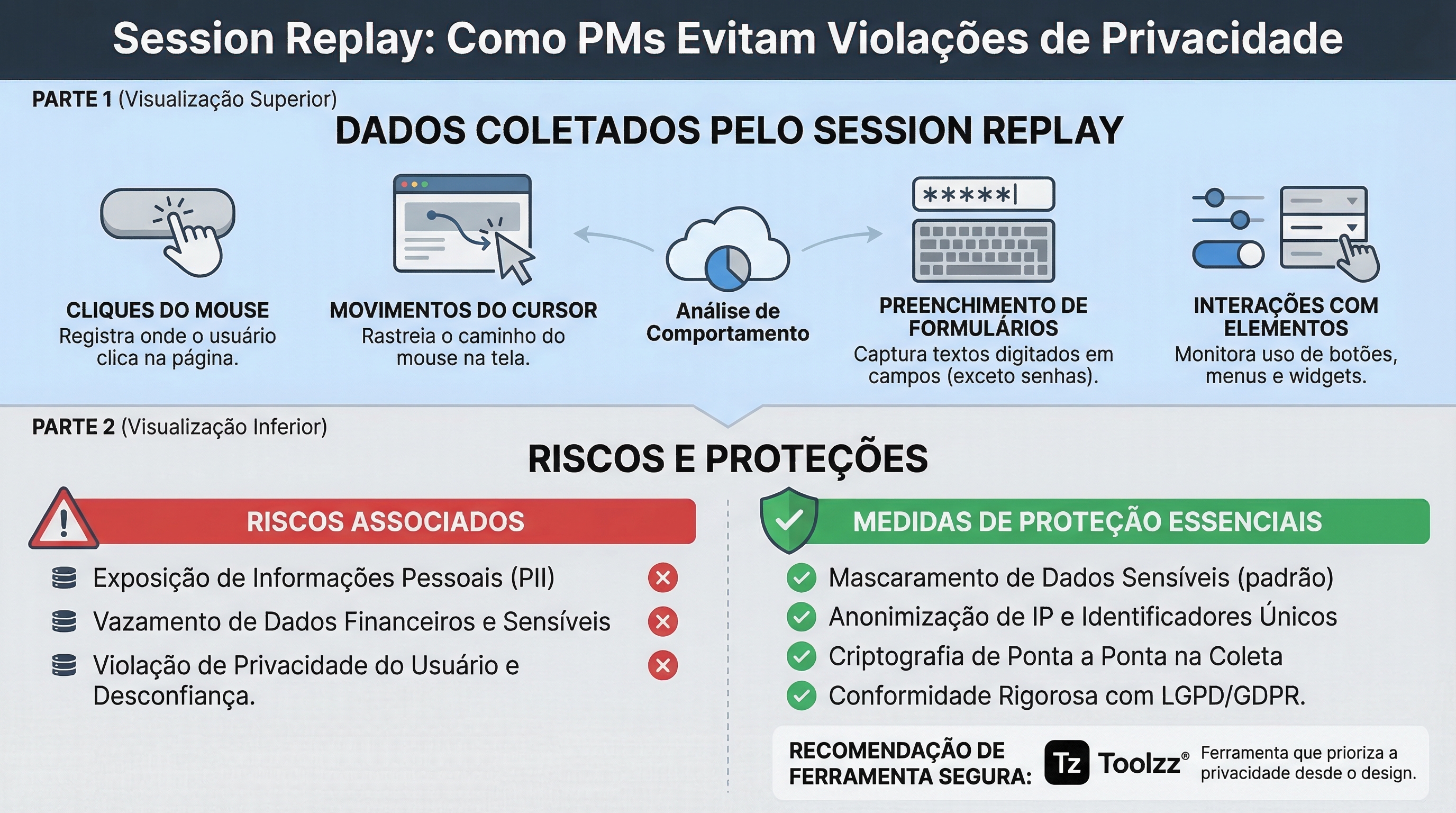
Session replay tools capture different types of user actions, from clicks and mouse movements to form filling and interface interactions. The ability to visualize real sessions allows you to identify usability issues, understand user behavior, and optimize the overall product experience. However, collecting this data requires caution, as sensitive information may be inadvertently recorded.
Data considered high-risk includes personally identifiable information (PII), such as names, email addresses, and financial information; authenticated views with personal data; data entered in forms, such as login credentials and payment information; and access to internal administration panels. Using session replay in these areas requires extra care.
A Secure Session Replay Framework for Product Managers
The key to implementing session replay responsibly lies in a well-defined framework. Start by assessing the data sensitivity on each page and workflow of your product. Classify them as low, medium, or high risk, and apply appropriate protective measures to each category. Checkout pages, for example, should have stricter restrictions than public marketing pages.
It's crucial to balance replay fidelity with privacy risk. Tools that capture all data details (DOM) offer more context but increase the chance of collecting sensitive information. Consider lower-fidelity alternatives, such as heatmaps or event logs, which can provide valuable insights without compromising privacy. Data masking is also important for hiding confidential information in real-time.
Finally, clearly define the responsibilities of each team involved: Product Managers, Engineering, and Legal. PMs should define the scope and prioritize the areas to be monitored. The Engineering team is responsible for technical implementation of privacy settings, and the Legal department must ensure compliance with regulations.
Setting Up Session Replay Securely in Production
When configuring session replay, prioritize secure default settings. Enable automatic PII masking and configure redaction levels to hide confidential information. Disable recording on routes and URLs containing sensitive data. Implement access controls to restrict access to replays for authorized teams.
A common mistake is configuring session replay too permissively, capturing more data than necessary. Test your settings exhaustively in a test environment before implementing them in production. Create test scenarios that simulate real user interactions and verify that sensitive data is being properly masked.
Want to see it in practice?
Request Toolzz AI demoCommunicating Session Replay Privacy Trade-offs
It's essential to communicate session replay privacy trade-offs to all stakeholders. Address the concerns of legal and security teams, ensuring the tool is used in compliance with the company's privacy policies. Explain to engineers how to configure and maintain privacy settings. And finally, demonstrate to leaders how session replay can provide valuable insights to improve user experience and drive product growth.
Common Pitfalls and How to Avoid Them
Some common mistakes include data leaks in e-commerce checkouts, configuration drift after new feature launches, and lack of adequate access controls. To avoid these problems, implement continuous monitoring of privacy settings, automate security testing, and establish clear data access policies.
Protect your users' data. Discover how Toolzz AI helps you avoid privacy violations during session replay analysis.
Session Replay Implementation Checklist
To ensure a successful and secure implementation, follow this checklist:
- Define the scope: identify the pages and workflows to be monitored.
- Classify the data: assess data sensitivity in each area.
- Configure privacy settings: enable masking, redaction, and deletion of sensitive data.
- Test in test environment: validate settings before launching in production.
- Communicate with stakeholders: address privacy and security concerns.
- Monitor continuously: check settings and update them as needed.
Building Trust-Centered Insights with Session Replay
By adopting a proactive and transparent approach to privacy, you can leverage the power of session replay to gain valuable insights without compromising your users' trust. Toolzz AI offers robust solutions for user behavior analysis, with a focus on security and privacy. Explore how artificial intelligence can enhance your analyses and optimize customer experience, always with data protection as a priority.
See how easy it is to create your AI
Click the arrow below to start an interactive demonstration of how to create your own AI.
























.webp)