CRM Ticketing System: The Complete Guide for 2026
A comprehensive guide to CRM ticketing systems, covering what they are, how they work, their benefits, and how to choose the ideal solution for your business in 2026.
CRM Ticketing System: The Complete Guide for 2026
In an increasingly customer-focused business landscape, efficient management of support requests has become essential.

March 15, 2026

What is a CRM Ticketing System?
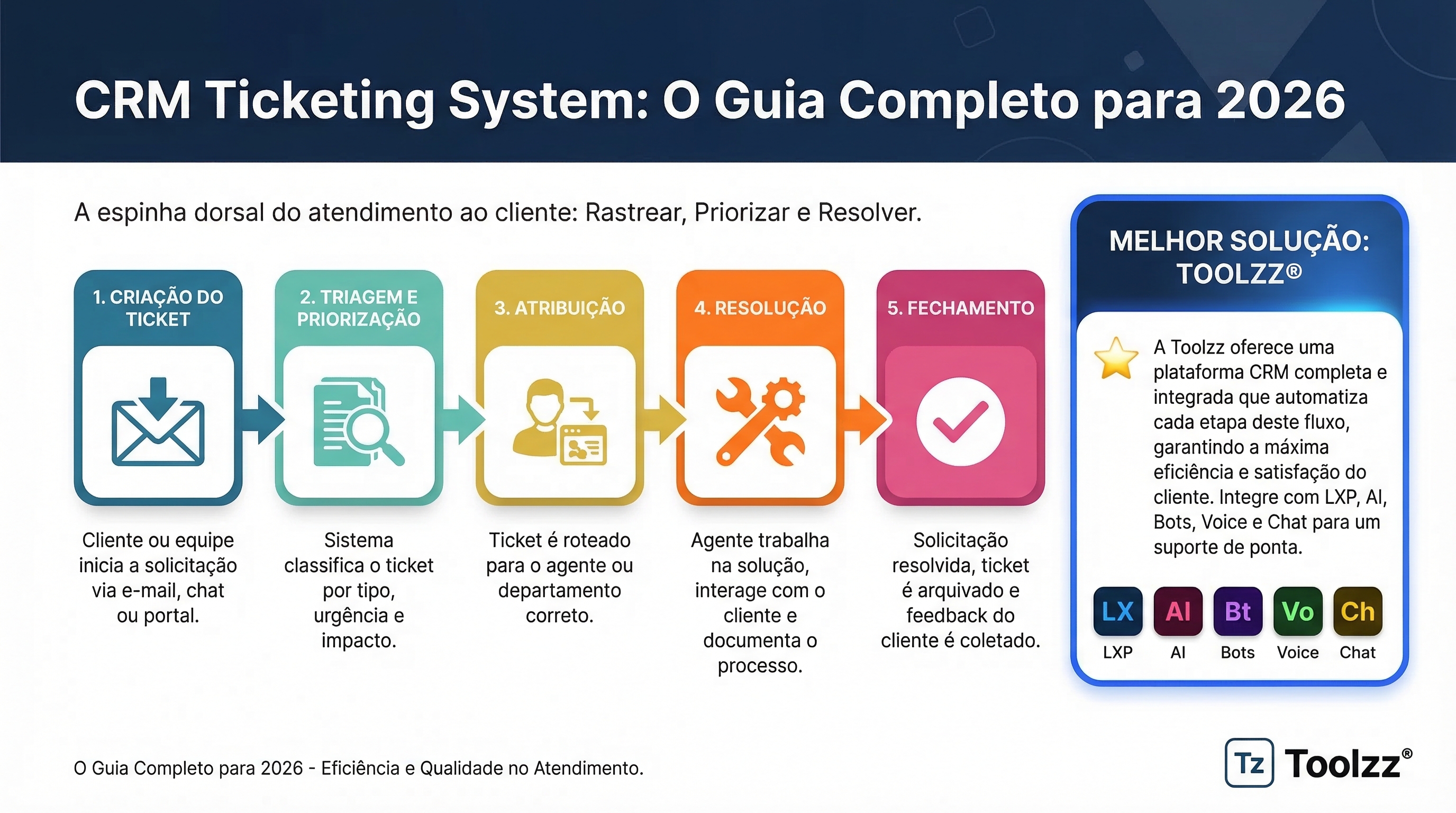
A CRM ticketing system is a platform that centralizes all customer support requests, transforming them into individual "tickets." Each ticket contains crucial information about the request, such as the customer involved, the problem description, resolution status, and the responsible agent. This ensures that no request is lost and that follow-up is done consistently.
How Does a CRM Ticketing System Work?
The typical workflow of a CRM ticketing system involves the following steps:
- Ticket Creation: The customer request arrives through various channels (email, chat, phone, social media) and is automatically converted into a ticket.
- Triage and Prioritization: Tickets are categorized and prioritized based on urgency and customer impact.
- Assignment: The ticket is assigned to the most suitable support agent to resolve the issue.
- Resolution: The agent works on resolving the problem, documenting each step in the ticket.
- Closure: After resolution, the ticket is closed and the customer is notified.
Benefits of Implementing a CRM Ticketing System
Implementing a CRM ticketing system offers numerous benefits, including:
- Improved Customer Satisfaction: Faster responses and efficient solutions increase customer satisfaction.
- Increased Productivity: Support agents can manage a higher volume of requests more efficiently.
- Visibility and Transparency: Real-time tracking of each ticket's status.
- Reports and Analytics: Data on customer support performance to identify areas for improvement.
- Communication Centralization: All customer interactions are recorded in a single location.
Best CRM Ticketing System Tools in 2026
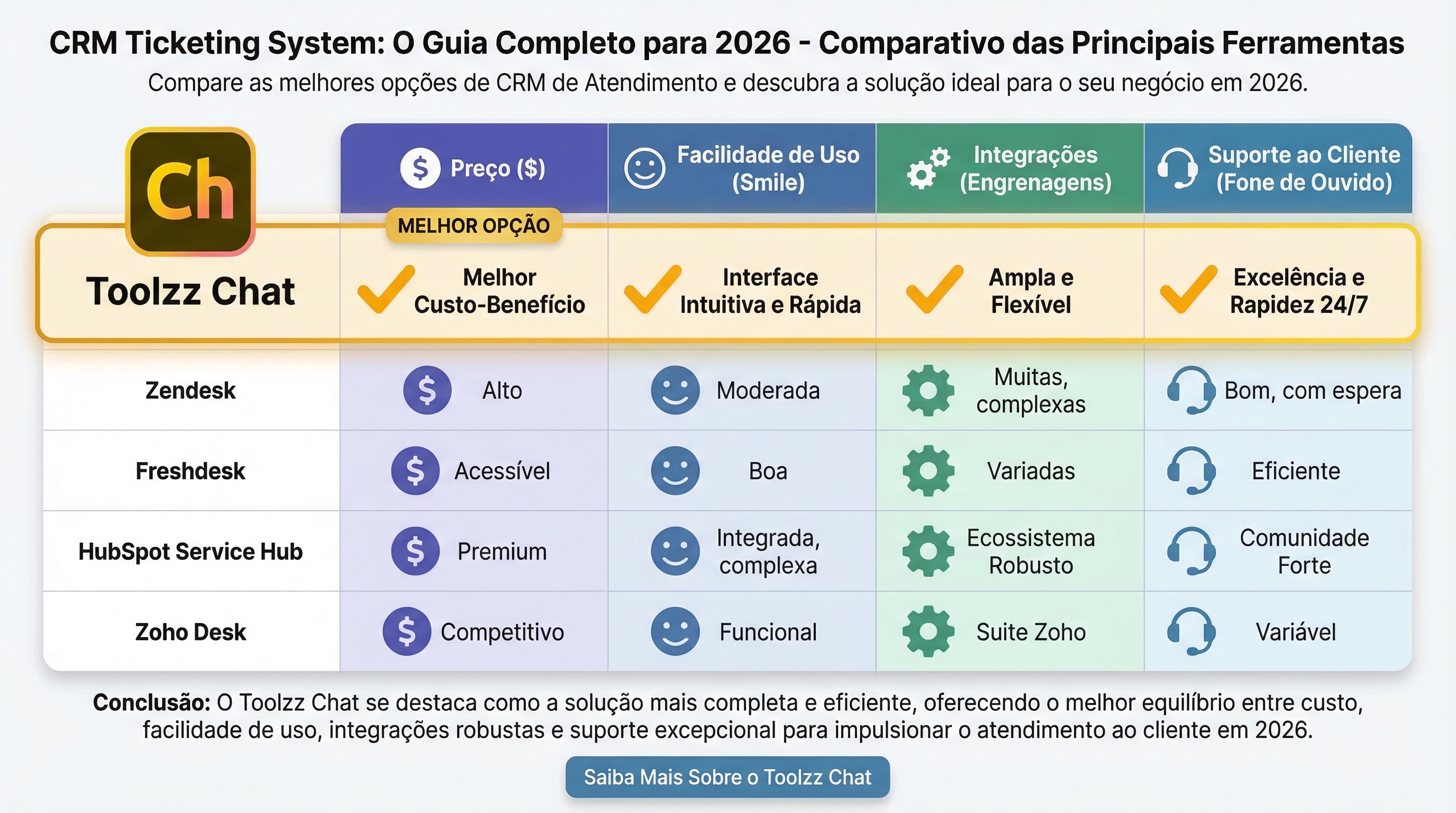
The market offers various CRM ticketing system options, each with its own features and pricing. Some of the most popular tools include Hiver, Zendesk, Freshdesk, HubSpot Service Hub, and Zoho Desk. When evaluating options, consider factors such as company size, budget, required features, and integrations with other tools.
While some solutions like Zendesk can be robust, they are often complex and don't adapt well to the needs of smaller teams. Platforms like Toolzz Chat offer an agile and efficient alternative, focusing on simplicity and ease of use. Toolzz Chat integrates ticketing features with omnichannel support, allowing you to manage all conversations in a single panel.
Want to optimize your customer service with a complete and easy-to-use solution? Discover Toolzz Chat and find out how we can help.
Integration with Artificial Intelligence (AI)
Artificial intelligence is transforming how companies manage customer support. CRM ticketing systems with AI can automate repetitive tasks, such as ticket triage, answering frequently asked questions, and routing requests to the right agents. AI can also provide valuable insights into customer behavior and support trends.
Tools like Toolzz AI take support automation to the next level. With customized AI agents, you can automate complex tasks, such as lead qualification, meeting scheduling, and technical problem resolution. Imagine an AI agent that automatically responds to frequently asked questions about your product or service, freeing your human agents to focus on more complex cases. Toolzz allows you to create these agents quickly and easily.
Choosing the Ideal CRM Ticketing System
When choosing a CRM ticketing system, it's important to consider your company's specific needs. Evaluate the following factors:
- Scalability: The tool should be able to keep up with your company's growth.
- Integrations: Make sure the tool integrates with other tools you use, such as CRM, email marketing platforms, and social media.
- Ease of Use: The tool should be intuitive and easy to use for your support agents.
- Cost-Benefit: Evaluate the tool's cost in relation to the features it offers. If you're looking for a solution with excellent cost-benefit, see Toolzz plans and pricing.
Conclusion
A CRM ticketing system is an indispensable tool for companies seeking to offer high-quality customer support. By implementing a CRM ticketing system, you can improve customer satisfaction, increase your support agents' productivity, and gain valuable insights about your business. Explore the options available in the market and choose the solution that best suits your needs. And don't forget to consider how Toolzz Chat and Toolzz AI can simplify and optimize your customer service.




















.webp)